Persona: All staff — start here
Entry: Product guides → first guide on every learning path
Exit: When you can log in and find Members & Payments, continue to Daily operations
What Fitness360 is#
Fitness360 is a gym management web application used day to day by gym staff and admins. It helps you:
- Manage members and memberships (gym and personal training plans)
- Record payments and issue bills
- Track attendance with QR check-in
- Chase renewals and overdue members
- Send WhatsApp reminders and campaigns
- Run leads, classes, finances, and analytics
Who uses it:
| Role | Typical user |
|---|---|
| Admin | Gym owner, manager — full configuration access |
| Employee | Front desk, floor staff — daily operations |
Note: If your gym white-labels the product, the name in the sidebar may differ from “Fitness360”. All features described here apply the same way.
Logging in#
- Open your gym’s Fitness360 URL (for hosted gyms:
app.gymkhana.fit). - Sign in with your phone number and password, or use Google / OAuth if your admin enabled it.
- You land on the Dashboard home.
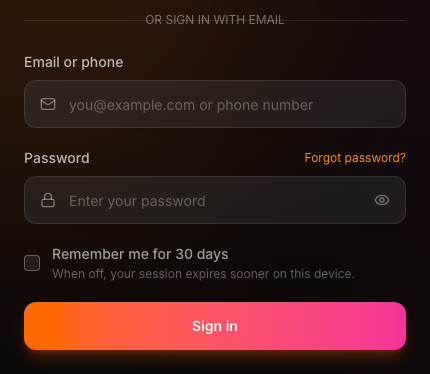
If you forget your password, use Forgot password on the login screen.
Session timeout#
For security, inactive sessions are logged out automatically:
| Role | Default inactivity timeout |
|---|---|
| Admin | 60 minutes |
| Employee | 120 minutes (2 hours) |
Admin only: You can change the employee timeout under Settings → Session (default shown there is often 240 minutes for configured policy — the app applies role-based limits on the client).
You get a warning about two minutes before logout. Move the mouse, scroll, or press a key to stay signed in.
Navigation overview#
The left sidebar groups features:
Overview#
| Item | Purpose |
|---|---|
| Dashboard | Home — stats, collections, renewals snapshot |
| Agent workspace | AI-assisted goals, approvals, gym facts |
| Analytics | Charts, cashflow, attendance insights |
Management#
| Item | Purpose |
|---|---|
| Members | Member list and profiles |
| Leads | Prospects and follow-ups |
| Payments | Payment ledger |
| Bills & Receipts | Invoices and receipts |
| Supplements (GST) | Supplement sales and GST invoices |
| Salaries & Expenses | Staff salaries and gym expenses |
| Renewals | Renewal pipeline and bulk WhatsApp |
| Overdue Tracking | Members past due |
| Reminders | Reminder history and unpaid queue |
| Campaigns | Segment-based WhatsApp campaigns |
| WA History | Audit log of WhatsApp sends |
| Quick admit / payment capture | |
| Classes | Class schedule and bookings |
| Marketplace | Optional integrations (payments, WhatsApp, etc.) |
Fitness#
| Item | Purpose |
|---|---|
| Attendance | QR check-in, walk-ins, trials |
| Workouts | Member workout logs |
| Challenges | Fitness challenges and leaderboard |
Admin (admins only)#
| Item | Purpose |
|---|---|
| Tasks | Admin inbox — data issues, late payments |
| Employees | Staff accounts and permissions |
| Trainers | Trainer commissions and payouts |
Settings (admins only)#
Team, notifications, session, plans, action logs, AI & MCP.
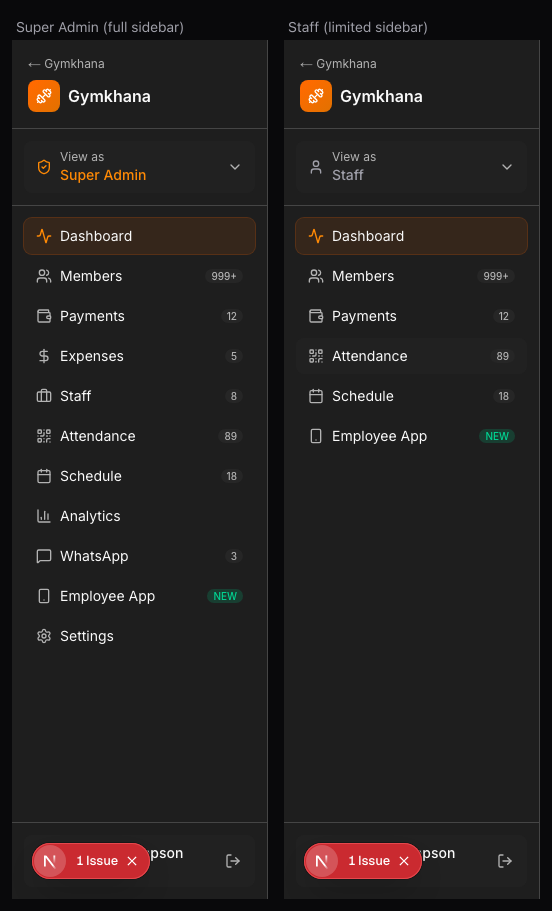
Employee view: When an admin enables Assume employee view, the sidebar shrinks to Members, Payments, and Attendance only — matching what front-desk staff see.
Admin vs Employee permissions#
Sidebar access#
| Area | Admin | Employee |
|---|---|---|
| Overview (Dashboard, Workspace, Analytics) | Yes | Yes |
| Management (members through marketplace) | Yes | Yes |
| Fitness (attendance, workouts, challenges) | Yes | Yes |
| Admin (tasks, employees, trainers) | Yes | No |
| Settings | Yes | No |
Edit permissions (employees)#
Employees default to read-only on sensitive modules. Admins can grant per-person checkboxes on Employees:
| Permission | What it allows |
|---|---|
| Edit members | Change member profiles |
| Edit payments | Record and edit payments |
| Edit renewals | Renewal actions |
| Edit reminders | Send and manage reminders |
| View reports | Analytics access |
| Send WhatsApp | Individual WhatsApp reminders |
| Bulk WhatsApp | Bulk send from renewals |
Account roles: Some gyms use organization-level roles (Owner, Admin, Staff) in addition to legacy Admin/Employee — Staff maps to the same read-focused access as Employee.
Permission matrix (summary)#
| Action | Admin | Employee (default) |
|---|---|---|
| Add member | Yes | If canEditMembers |
| Record payment | Yes | If canEditPayments |
| Mark attendance | Yes | Yes |
| Send WhatsApp reminder | Yes | If canSendWhatsAppReminders |
| Edit lifecycle templates | Yes | No |
| Manage plans & pricing | Yes | No |
| Add/remove employees | Yes | No |
| View WA History | Yes | Yes |
| Run campaigns | Yes | Yes (send may need permission) |
Assume employee view (admin preview)#
Admin only.
Admins can preview the staff experience without logging out:
- Go to Settings → Session (or the assume-view control in settings).
- Toggle Assume employee view on.
- Sidebar shows only Members, Payments, Attendance.
- Toggle off to return to full admin navigation.
Use this to verify what front-desk staff actually see before changing their permissions.
WhatsApp status#
The sidebar footer shows WhatsApp status — connected or disconnected. If disconnected, automated and manual WhatsApp sends will fail until an admin reconnects Meta WhatsApp Business API (WABA) in settings.
See Renewals & retention and Configuration.
Next steps#
- Daily work: Daily operations
- Renewals & messaging: Renewals & retention
- Admin setup: Configuration